Prospective Relative-Risk Model

Roadway Infrastructure Safety Kinematics

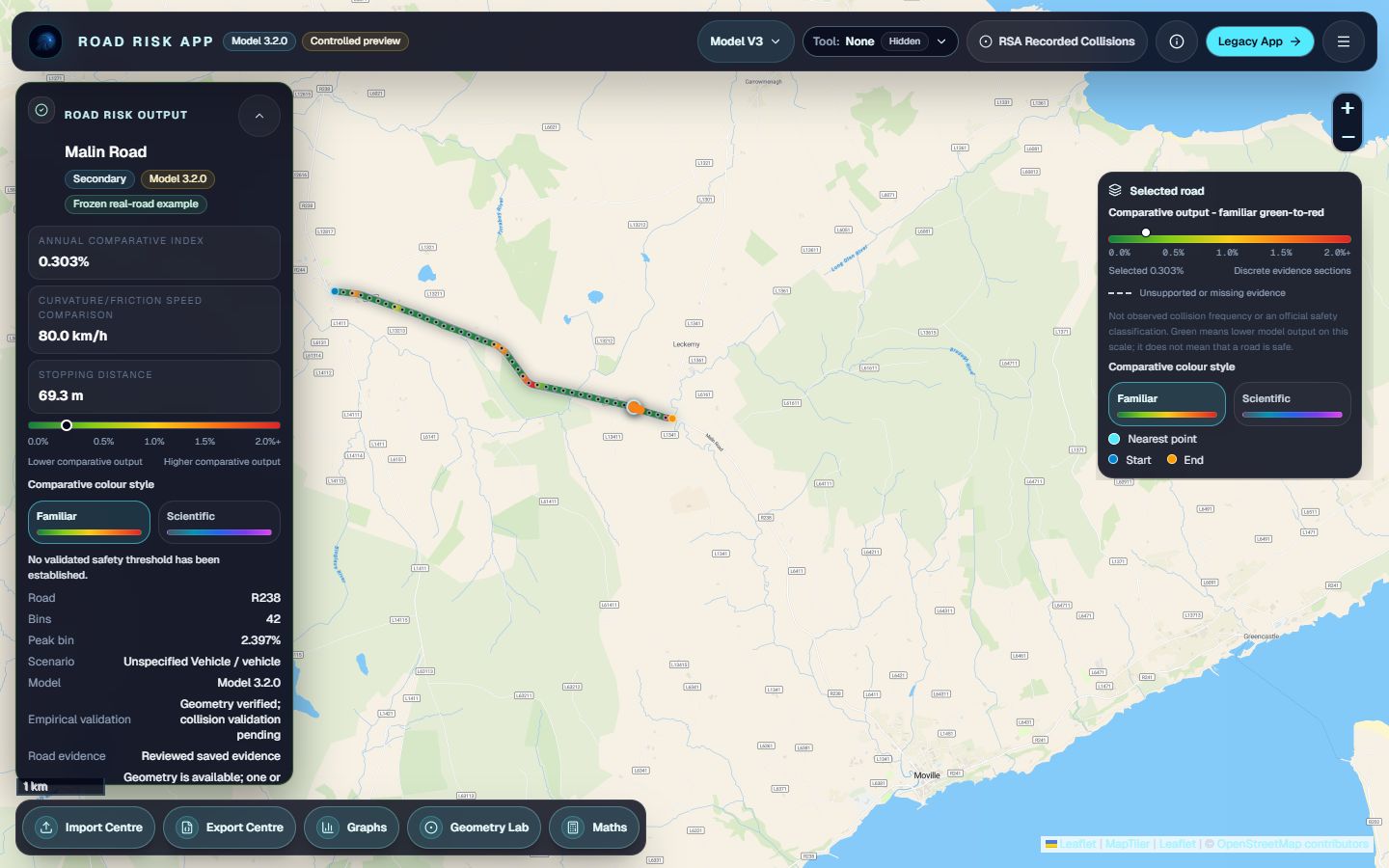
Road Risk converts public road geometry into an inspectable physics-based model. Select a road, derive its geometry, apply scenario assumptions, and compare the resulting model output against wider road-network samples.

OpenStreetMap Overpass API Geometry Physics Statistics
Model boundary

Model outputs are comparative estimates based on public road geometry, physics-informed calculations, and selected assumptions. They are not official crash predictions or road-safety ratings.

Annualised Comparative Model Output
--

Generated in the live app after a road is selected and scenario assumptions are set.

Route Analysis

Distance, duration, sampled risk, hotspots, route overlays, and exports live inside the app.

Illustrative preview, not a reviewed case study. Static overview of the live application outputs: selected-road geometry, comparative model output, route context, and exportable evidence.

Project at a Glance

What Should Be Understood First

Research Question

Can Public Geometry Support Prospective Comparison?

R.I.S.K. tests whether road shape, physics-based reasoning, and controlled assumptions can identify relative differences before collision-history data is introduced.

Data Source

OpenStreetMap-Derived Road Geometry

The live app uses public OSM-derived ways, nodes, tags, and selected-segment geometry through the public mapping data pipeline.

Core Physics

Curvature, Radius, Safe Speed, and Stopping Distance

Coordinate geometry is converted into kinematic outputs that describe turning demand and stopping-distance sensitivity.

Scenario Testing

Rain, Fog, Fatigue, Overspeed, Vehicle Type, and Surface

The same road can be retested under explicit assumptions to show how model output changes.

Comparative Output

Relative Indicator, Not Crash Prediction

Outputs show whether a road appears typical, elevated, or unusually demanding within a sampled model context.

Limitation

Transparent Prototype Boundary

The model is not an official safety rating and has not been fully calibrated against national collision-history datasets.

For Judges

What to Inspect First

The intended competition route is deliberately short: understand the research question, check the method, inspect saved results, then test the live model.

1 / Project

Research Question and Hypothesis

Start with why the project tests public road geometry and physics-informed assumptions before collision-history data is introduced.

2 / Live Model

Outputs and Inspectability

Open the app, select a road, read the Annualised Comparative Model Output, safe speed, stopping distance, and data-confidence notes.

3 / Results

Evidence Boundary

Use the dashboard to inspect saved model-output records while keeping the boundary clear: not observed crash rates, not official ratings.

Data Pipeline

From Public Road Data to Relative-Risk Output

The public site explains the same pipeline used by the live app. The goal is transparency: what is measured, what is derived, what is assumed, and what the output can responsibly mean.

01

Public Road Data

Road Risk queries public map data and road geometry rather than relying on static screenshots or decorative map tiles.

02

Selected Geometry

The clicked road is projected onto its road polyline so length, heading, radius, and curvature can be derived from geometry.

03

Physics-Informed Model

Curvature, speed, friction, stopping distance, and safe-speed checks are interpreted through transparent formula blocks.

04

Scenario Assumptions

Weather, lighting, vehicle profile, behaviour, traffic exposure, and missing data are handled as explicit assumptions.

05

Relative-Risk Output

The result is a modelled comparison supported by graphs, maths, exports, and clear limits.

Using Road Risk

Responsible Interpretation Workflow

01

Launch the Application

Open the live map and choose a location.

02

Select a Road

Click a visible road segment and check the highlighted geometry.

03

Read Model Outputs

Start with annual output, safe speed, and stopping distance.

04

Change Scenario Assumptions

Adjust weather, vehicle, speed, visibility, and driver context.

05

Open Mathematical Detail

Inspect how the current values are derived.

06

Compare Distributions

Use percentile context before interpreting a raw model output.

07

Export Results

Preserve geometry, assumptions, values, and evidence.

System Scale

A Research Project Built Around a Live Analytical Application

Source Code
~19.8k

Approximate lines across the live app and public project files.

JavaScript
~15k

Approximate live-app logic for map interaction, modelling, routes, graphs, and exports.

CSS
~4k

Approximate interface styling across the app and public research pages.

Tracked Versions
120+

Iteration history used to develop, test, and refine the prototype.

Development Logs
40

Booklet-style development entries documenting the research and build sequence.

Interface Elements
249

Unique visible controls, panels, outputs, and interface elements across the live application.

Interactive Controls
100+

Scenario, route, graph, export, and interpretation controls exposed to the user.

Vehicle Profiles
12

Vehicle presets used to vary model assumptions and interpretation context.

OSM Attributes
22

Road tags considered across geometry, context, surface, speed, and infrastructure assumptions.

Risk-Factor Defaults
25

Default modelling values used to keep assumptions explicit and reviewable.

Assumption Profiles
3

Scenario profiles for comparing how conditions alter the same road geometry.

Graph Views
9

Distribution views for percentile context, tail behaviour, and comparative interpretation.

Statistical Indicators
18

Summary indicators used to interpret selected roads, distributions, and route-level outputs.

Exports
5

CSV, GeoJSON, JSON, distribution data, and PNG-style reporting outputs.

Output Interpretation

Model Outputs as Part of the Evidence Trail

The live app surfaces several values because no single number should carry the full interpretation.

Annualised Comparative Model Output

Primary Comparative Indicator

Scenario-adjusted model output for the selected road. It appears in the risk card, graphs, mathematical detail, and exports; it is not an observed crash rate or official assessment.

Daily Interpretive View

Time-Scale Interpretation

Converts the annual output into a daily-style view for interpretation. It does not turn the model into an observed daily crash rate.

Safe Speed

Physics-Informed Curve Check

Shows a simplified friction-limited speed estimate for the selected geometry and scenario assumptions.

Stopping Distance

Reaction and Braking Demand

Shows how speed, reaction time, and friction assumptions affect the distance needed to stop.

Infrastructure Rating

Infrastructure Context Indicator

Summarises visible infrastructure/context clues and fallback assumptions. It is not an official road-standard rating.

Percentile Context

Sampled-Network Comparison

Places the selected road relative to sampled roads under the current assumptions so raw model outputs are easier to interpret.

Route Mean / Peak

Route-Level Summary

Route analysis can show mean model output and the highest sampled segment, helping identify local hotspots along a route.

Model Preview

Model Outputs Depend on Visible Assumptions

Road Risk is designed as an inspectable modelling surface. It shows the result, but also the geometry, formula chain, scenario choices, confidence notes, and exportable evidence trail behind it.

Interpretation note

The app does not claim to estimate an observed crash rate for an individual road. It provides a comparative model output that can support research, discussion, education, and early screening.

Primary Output

Annualised Comparative Model Output

A scenario-adjusted comparative value used consistently across the risk panel, maths, graphs, and exports.

Physical Output

Safe Speed and Stopping Distance

Curvature, friction, reaction time, and speed assumptions are translated into interpretable vehicle-motion checks.

Context Output

Percentile and Hotspot Context

A selected road can be compared against sampled roads nearby, making the output less isolated and more interpretable.

Mathematical Basis

Geometry and Vehicle-Dynamics Relationships

These compact examples mirror the physics language used on the Maths page and in the live app's method panels.

Radius

Road Bend Geometry

\[ r = \frac{L}{\theta} \]

Segment length and heading change produce a curve-radius estimate.

Safe Speed

Friction-Limited Speed

\[ v_{\text{safe}} = \sqrt{\mu g r} \]

Friction and radius create a simplified turning-speed check.

Stopping Distance

Reaction and Braking Demand

\[ d_{\text{stop}} = v t_r + \frac{v^2}{2 \mu g} \]

Speed, reaction time, and friction assumptions shape stopping demand.

Applications and Scope

Built for judges, teachers, students, researchers, and safety organisations

Education

Connect Road Geometry to Physics

Students can see curvature, speed, friction, stopping distance, and uncertainty on real roads rather than abstract textbook diagrams.

Research

Inspect a Transparent Pipeline

The model separates measured geometry, public tags, derived quantities, assumptions, and comparative outputs.

Road Safety

Support Early-Stage Screening

Proactive modelling can highlight roads worth inspecting while remaining clear that formal audits require more evidence.

Public Sector

Export and Communicate Evidence

CSV, GeoJSON, JSON, graph, and map outputs make the analysis easier to review, discuss, and reproduce.

Site Structure

Review the Method, Then Test the Live Model

Deep technical references: Features Maths Graphs Assumptions Validation Glossary
Live Application

Open the Road Risk Live Model

Select a road, inspect the model output, change assumptions, generate graphs, analyse routes, and export the same evidence trail described across this site.